 Kithara
Supported formats
Anything Android's Media3 player can decode, in other words. Audible .aax files are DRM-protected and will not play in Kithara or any third-party player. Kithara plays the DRM-free files you buy from shops such as Libro.fm and Downpour, rip from CDs you own, or get from LibriVox; the Leaving Audible guide has the full list.
How a folder becomes a book
- A folder of numbered files is one book on one continuous timeline. Skip back ten seconds at the very start of part three and you land at the end of part two, not at 0:00.
- Natural sort. "Track 2" comes before "Track 10", so books ripped without zero-padding still play in order.
- Each .m4b is its own book by default. If your rips are split into "Part 1" and "Part 2" m4b files, a switch under Settings, Library & sync treats the folder as one book instead.
- Metadata from tags. Title, author, narrator, album and duration are read from the file tags, so a well-tagged library needs no renaming.
- Cover art comes from embedded artwork first, then a
cover.jpgorfolder.jpgbeside the files, then the server if there is one. - Rescans never lose your place. Books are identified by a stable id derived from where they live, so rescanning a folder updates them in place.
Folders are chosen through Android's own folder picker, and the permission is kept across reboots. You can point Kithara at internal storage, an SD card, or a USB drive.
Where chapters come from
Most players hand chapter parsing to the platform, and Android's own metadata retriever does not expose chapter atoms at all. Kithara walks the container itself, which is why it finds chapters that other apps miss. In order of preference:
- The m4b
chplchapter atom, the flat Nero-style list written by ffmpeg, AudiobookBuilder, m4b-tool and most m4b tools. - The QuickTime chapter text track, referenced by
tref/chap, with titles dug out ofmdatvia the sample tables. This is the layout Apple's tools write. - ID3v2
CHAPframes in mp3 files, both v2.3 and v2.4. - A
.cuesheet beside a single large file. - The server's chapter list, for Audiobookshelf and sync-server libraries.
- One chapter per file, as a fallback for multi-file books with no marks at all.
Whichever source they come from, chapters are stored against the book-wide timeline. Chapter 14 behaves identically whether the book is one m4b, forty-two mp3s, or streamed in three parts from a server, and a chapter is allowed to span a file boundary.
"My chapters are not showing"
If a single-file book shows no chapters, neither a chpl atom nor a chapter text track was found in it. Some sellers strip them, and some conversion tools drop them on the way to m4b. Two fixes, both walked through step by step in How to add chapters to an m4b:
- Re-mux the file with chapters using ffmpeg, m4b-tool or AudiobookBuilder; these all write the
chplatom Kithara reads first. - Put a
.cuesheet next to the file with the same base name. Kithara will use it.
Kithara does not re-parse a streamed file over the network for chapters; server libraries should supply them.
Playback details
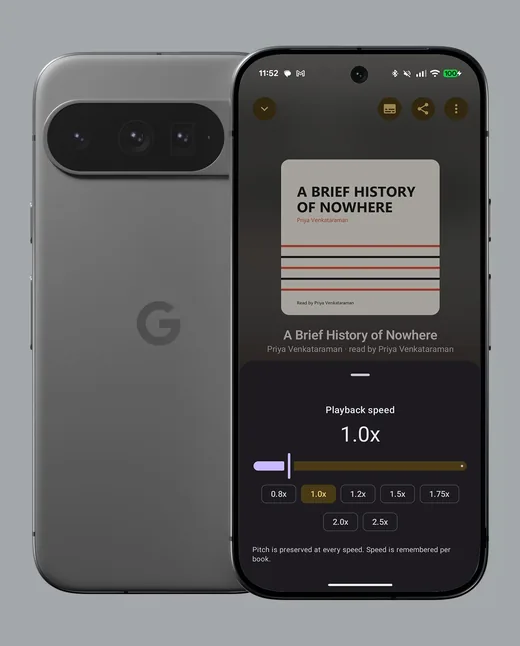
- Speed from 0.5x to 3.5x with pitch preserved, remembered per book. Skip silence is a separate switch.
- Skip intervals are configurable independently for back and forward: 5, 10, 15, 30 or 60 seconds.
- Your position is saved every five seconds and on every pause, seek and stop, and resumes with a short rewind scaled to how long you were away.
- "Previous chapter" restarts the current chapter if you are more than five seconds into it, the way a CD player does.
- Chapter trims (Pro): per book, skip a set number of seconds at the start and end of every chapter, and jump short credits chapters whole. Set once from the book's menu; applied live.
- Up next (Pro): queue any book to play when this one ends, or let the next unfinished book in the same series follow automatically.
- Clear speech and boost (Pro): a voice filter that cuts rumble and lifts presence for cars and kitchens, and up to 12 dB of gain through a soft limiter for quiet recordings. Both live in the speed sheet.
- Start from the beginning puts a book back to not started, position and all.