Kithara
Smart chapter recognition
Chapter lists come straight out of the file. If none are available or lists are generic, Kithara can read and dynamically name your chapters by sampling the audio. A folder of numbered mp3s becomes one book on one timeline.
Point Kithara at a folder on your phone, a server on your home network, or the free LibriVox catalogue. It reads the chapters out of the files themselves and keeps your place in step across every device you listen on.
Free to listen. No ads, no account, no analytics, no time limit.
One player expertly synced across the app, the notification, your car and your headphones. Never lose your spot again.
Chapter lists come straight out of the file. If none are available or lists are generic, Kithara can read and dynamically name your chapters by sampling the audio. A folder of numbered mp3s becomes one book on one timeline.
Speed from 0.5× to 3.5× with pitch preserved and remembered per book. Skip silence. Jumps of 5 to 60 seconds that cross file boundaries, so skipping back at the start of part three lands you in part two.
Count down or stop at the end of the chapter. The volume fades over the last twenty seconds instead of cutting dead, and a shake of the phone adds more time without opening your eyes.
Your position is saved every five seconds. A phone call or a navigation prompt hands back five seconds when it ends, and the rewind on resume scales from two seconds to thirty with how long you were away.
Browse by continue listening, author or library on the head unit, with voice search over title, author, narrator and series. A press of play on your headphones picks up your last book with no app open. Kithara in the car.
Label a moment and jump back to it later. Search, filter and sort your library, pin favourites, and mark a book finished with a tap. You can even search your books with automatic transcription.



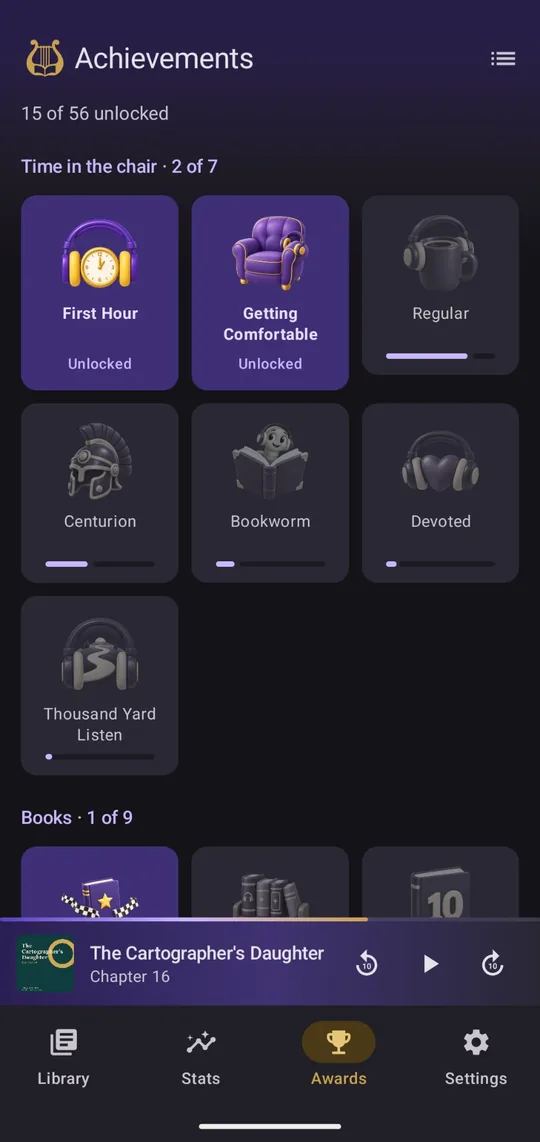
Pro is a one-time unlock through Google Play. It pays for the work and adds a few comforts. Stats and achievements record from day one, so unlocking later shows your full history. Everything Pro includes.
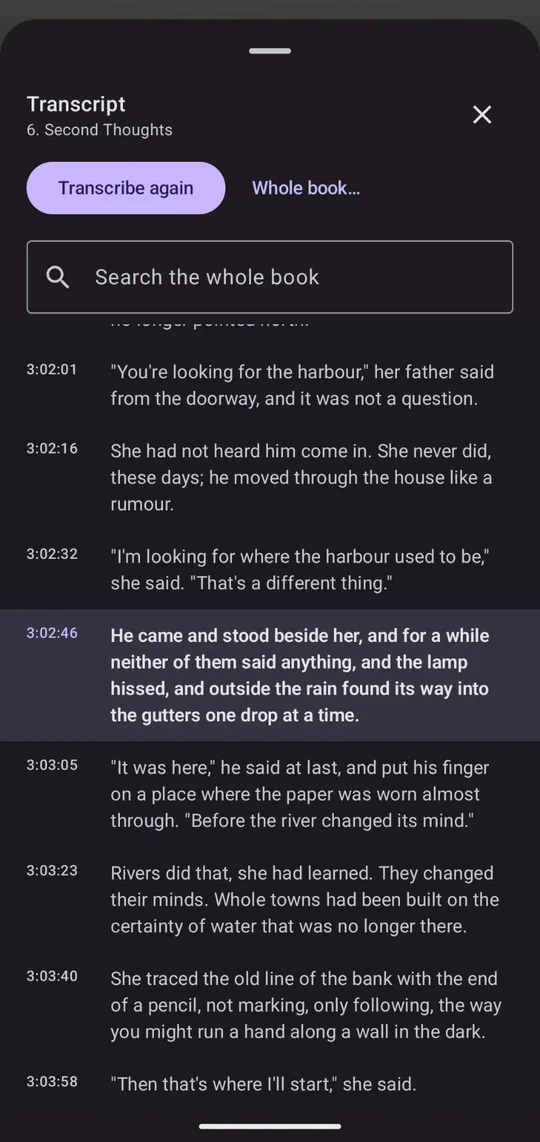
Kithara turns any chapter into timed text, entirely on your phone. Nothing is uploaded and nothing leaves the device. Tap a passage to jump there, or search the whole book for a phrase you half remember.
Pick the model that suits your phone: tiny is fastest, small is closest to a dictation app. Models download once, and long chapters transcribe in the background. How transcripts work.
Pick a folder on the device, sign in to your Audiobookshelf server, or add LibriVox and search its free catalogue. Kithara reads titles, authors, narrators, covers and chapters from the files.
Playback keeps running in the background, in the notification, on the lock screen and in the car. Downloads and sync can be limited to Wi-Fi.
With a server connected, your position, finished state and bookmarks follow you between devices. Listen offline for a week and your unpushed progress still wins when you reconnect.
Audible .aax files are DRM-protected and will not play in Kithara or any third-party player. Kithara plays the DRM-free files you buy from shops such as Libro.fm and Downpour, rip from CDs you own, or get from LibriVox. Formats and chapters in detail.
Yes. Everything you need to listen is free, with no ads and no time limit: playback, chapters, speed and skip silence, the sleep timer, Android Auto and Bluetooth controls, bookmarks, search, any number of libraries, Audiobookshelf and kithara-server libraries, streaming, downloads, and your position synced across devices. Kithara Pro is a one-time purchase through Google Play, not a subscription, and not needed to listen. It adds listening stats and achievements, transcripts, clear speech and volume boost, an up-next queue and chapter trims, home-screen widgets, a year-in-review card, backup and restore, and themes and app icons.
Yes. Add your Audiobookshelf server with its address, username and password. Books stream by default, you can download any book for offline listening by tapping the cloud badge on its cover, and your position syncs across devices. Kithara is written against the Audiobookshelf v2 API. Server libraries are free. No server yet? This site has a step-by-step setup guide.
m4b, m4a, mp4, aac, mp3, ogg, oga, opus, flac, wav, wma, mka and 3gp. A folder of numbered mp3s is treated as one book on one continuous timeline. Audible .aax files are DRM-protected and will not play.
No. There is no Kithara account, no sign-up and no analytics. The only network requests the app makes are to servers you add yourself, such as your own Audiobookshelf, and to LibriVox and the Internet Archive if you add the LibriVox library.
It reads them out of the files: the chpl chapter atom and QuickTime chapter track in m4b files, ID3 CHAP frames in mp3s, a .cue sheet beside a single large file, or the chapter list from your server. If a multi-file book has no chapter marks, each file becomes a chapter. Files with no chapters at all can be fixed in ten minutes with ffmpeg; see the how-to on this site.
Yes. Add LibriVox as a library and you can search thousands of free, volunteer-read public-domain audiobooks by title or author, add them to your library, stream them from the Internet Archive or download them for offline listening, with a chapter per section. It is part of the free app, not Pro, and needs no account.
English, French, Spanish, German, Portuguese (Brazil) and Italian. Pick one in Settings, Language, or let it follow the phone. Every language except English was machine-translated and checked by us rather than by native speakers, so if a screen reads badly, please tell us and we will fix it. Transcripts are English-only for now, because the on-device speech models only understand English.
Yes, with Pro. Settings, Data and storage, Back up writes one file with your positions, finished books, pins, speeds, bookmarks, listening history, achievements and settings. Restore it on the new phone after adding the same libraries and the books line up by id, or by title, author and length. Audio, covers and transcripts are not in the file, and neither are server passwords or tokens.
Not yet. Kithara runs on Android 8.0 or later. A native iPhone and iPad version is in development; it shares the sync protocol and the backup format with the Android app, so a Kithara server keeps your place across both and a backup made on one restores on the other. There is no release date, and this site will say so the day there is.
Yes. Your libraries, continue listening, recently added, authors and the current book's chapters all appear in the car, with voice search over title, author, narrator and series, and 10-second skip buttons on the head unit. Bluetooth play resumes your last book without opening the app.
With a server library, yes: position and finished state sync through Audiobookshelf or kithara-server, our own one-binary server, or any Kithara sync server, and unpushed local changes always win, so listening offline never rewinds you. Bookmarks sync both ways with a Kithara server and push one way to Audiobookshelf. Listening stats and achievements stay on each device.
A Pro feature that turns a chapter into timed text using a Whisper speech-recognition model that runs entirely on your device. The first time you use it, Kithara downloads an English model of about 105 MB to 360 MB, depending on the size you choose. Nothing you listen to is sent anywhere.
Kithara is a player, not a store. It plays DRM-free files you already own: purchases from DRM-free audiobook shops, rips of CDs you own, or anything in your Audiobookshelf library. It also has LibriVox built in: thousands of free public-domain audiobooks you can search, stream and download without an account. The how-to on leaving Audible lists the DRM-free shops.
No analytics, accounts, telemetry, or ads. Kithara talks to your server(s) and to LibriVox if you add it, and nothing else apart from a one-time speech model download if you use transcripts. Read the privacy policy, it's short.
The app is on Google Play as an internal test, and Google only lets in accounts on the tester list. Leave the Google account email you use on your phone and we will add you, then send one message when it goes public.
Already on the tester list? Open the test on Google Play with that account, accept the invitation, and install.